The left navigation
VNCmail+ has two left columns: a narrow app rail and a wider panel that switches between Folders, Tags and Calendar.
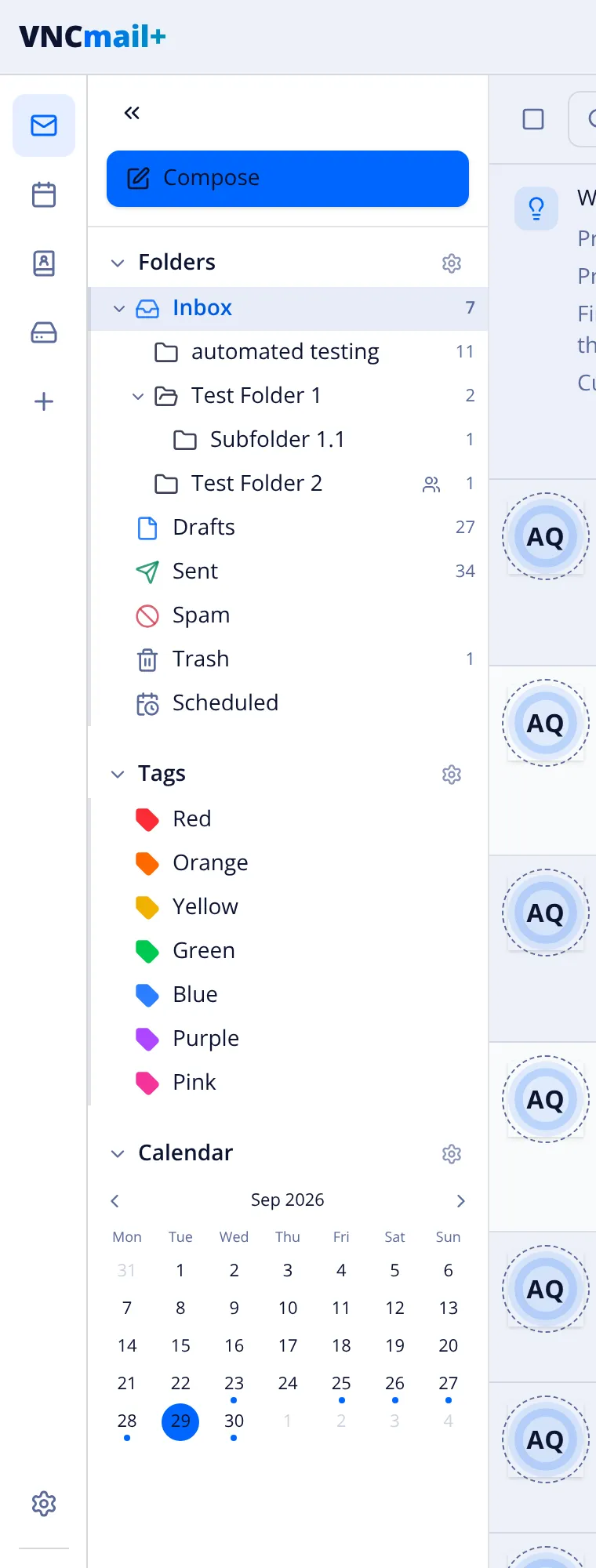
The app rail (far left)
Section titled “The app rail (far left)”| Icon | Opens |
|---|---|
| The mail views (this app). A badge shows unread. | |
| Calendar | Your calendars and events. |
| Contacts | Your contacts (from VNCcontacts+). |
| Files | Your files (from VNCfiles). |
| + | Compose a new message. |
| ⚙ Settings | Mailboxes, signatures, filters and preferences. |
| ⌨ Shortcuts | The keyboard-shortcut reference. |
| ⓘ Info | Version and about. |
| Avatar | Your account and sign-out. |
→ Accounts and interface · Compose options
Folders
Section titled “Folders”The standard Inbox, Drafts, Sent, Spam, Trash and Scheduled, plus your own folders and subfolders (folders can be shared — the people icon). Counts show unread / total (for example Inbox 4 / 14). The gear opens folder settings. → Message actions
Coloured tags — Red, Orange, Yellow, Green, Blue, Purple, Pink. Select one to filter the list to that tag; the gear manages them. → Message actions
Calendar
Section titled “Calendar”A mini month with dots on days that have events; the arrows change month and selecting a day filters the list. The gear opens calendar settings. → Calendar reference