The left navigation
VNCcrm groups its left menu into sections. Sales is always open; the rest expand with a click. Search… (⌘K) at the top is the semantic search over everything you can see.
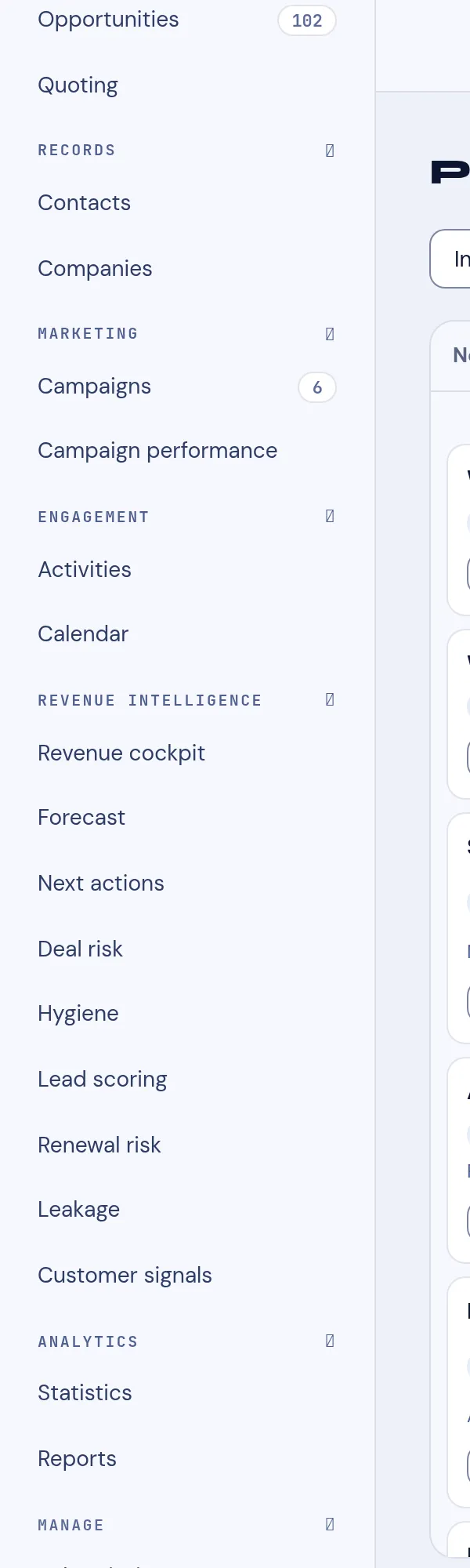
| Item | Shows |
|---|---|
| Pipeline | Deals as columns by stage. |
| Leads | The leads queue (a count on the right). |
| Opportunities | The opportunities/deals list. |
| Quoting | Quotes for your deals. |
→ Work the pipeline · Pipeline stages · Deal details
Records
Section titled “Records”- Contacts — people (from VNCcontacts+).
- Companies — accounts and their deals.
Marketing
Section titled “Marketing”- Campaigns — outbound campaigns (with a count).
- Campaign performance — how they performed.
Engagement
Section titled “Engagement”- Activities — calls, meetings, tasks, notes and emails across records — Activities in VNCcrm.
- Calendar — the deal calendar.
Revenue intelligence
Section titled “Revenue intelligence”- Revenue cockpit — the deal/revenue overview.
- Forecast — the weighted forecast.
- Next actions — what to do next per deal.
- Deal risk — risk flags.
- Hygiene — data- and process-hygiene issues.
- Lead scoring — lead scores.
- Renewal risk — renewals at risk.
- Leakage — revenue leakage.
- Customer signals — buying/intent signals.
→ Revenue intelligence · How the forecast works · Deal risk · Pipeline hygiene
Analytics
Section titled “Analytics”- Statistics — the counts and trends.
- Reports — saved analyses.
Manage
Section titled “Manage”- Subscriptions — seats and entitlements.
- Smart lists — saved filters.
- Audit — who changed what.