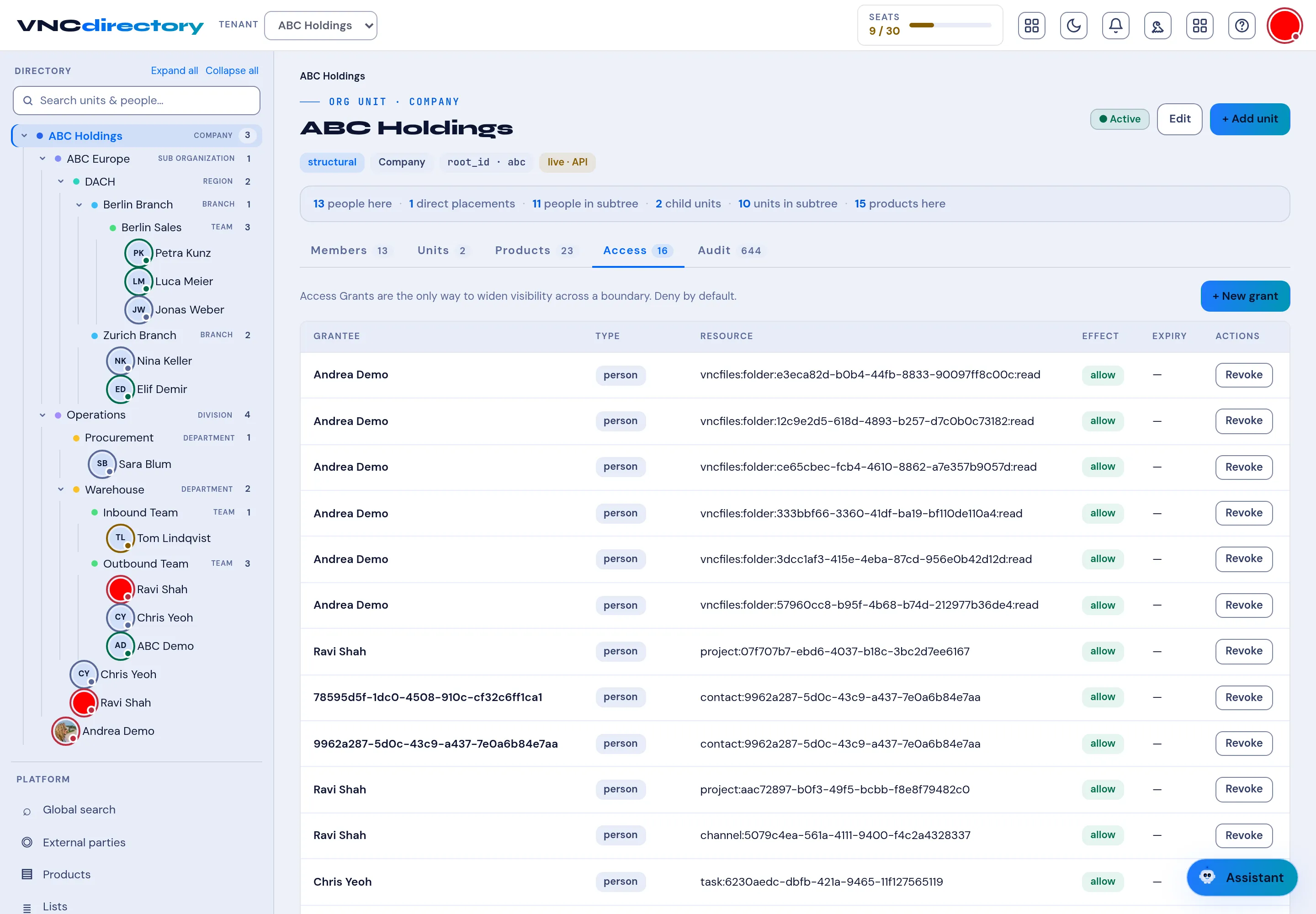
Access grants
The Access tab of a unit lists the grants that widen visibility across a boundary. The rule is deny by default — a grant is the only way to allow it.
The list
Section titled “The list”| Column | Meaning |
|---|---|
| Grantee | The person (or unit) the grant is for. |
| Type | person, unit, … |
| Resource | What is shared — a files folder, project, contact, channel, task, and so on (<app>:<kind>:<id>:<right>, for example vncbfiles:folder:…:read). |
| Effect | allow or deny. |
| Expiry | When the grant lapses, or — for none. |
| Actions | Revoke removes the grant. |
Select + New grant to add one.
Who can see and revoke a grant
Section titled “Who can see and revoke a grant”The list is scoped to you: a member sees the grants they created, and an administrator sees every grant on the resource. Revoke is available to the creator or an administrator — being able to see your own grant means you can take it back.
Where grants come from
Section titled “Where grants come from”Sharing an item in another product — for example Share with people in VNCfiles — writes a grant here. VNCdirectory+ is the single grant store, so the authoritative list of who can see what lives in this tab.